Please Read: Effective August 7th, 2026, support.acmeticketing.com and developers.acmeticketing.com will go offline. Please see our new help site at
help.acmeticketing.com and
api-help.acmeticketing.com for API requests.
Note that our new helpdesk leverages SSO for a simplified login experience. You will need to have an email address registered in ACME Backoffice to reach our new site.
If you have any questions or challenges with access, please email
support@acmeticketing.com for assistance.
Administration: Payment settings configuration (Worldpay Testing)
Print
Modified on: Thu, 28 Dec, 2023 at 1:12 PM
Note: This is only for Sandbox testing with ACME test cards. Production credentials are installed from Worldpay over an API call. Check with Finance for details.
2. Click on PAYMENT tab
3. Select payment processor = Express
This will reveal the Express Credentials fields.
Configure the following for all tenants:
- Express URL: https://certtransaction.elementexpress.com
- Express Account ID: 1056679
- Express Account Token: C9BDBBDE1FA0A47FCEB78D5F0E8C19C6E1E6E0B65CBBB572DCF8839878B162B182510C01
- Express Application ID: 8577
- Acceptor Id: 874767462
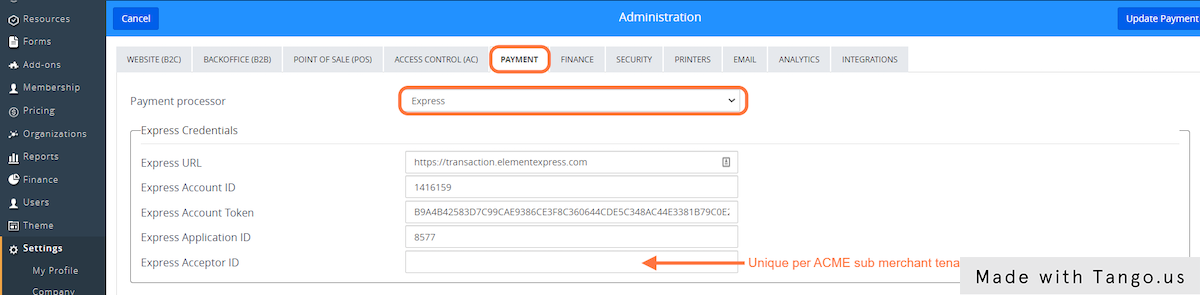
5. Click Update Payment to save.
This Workflow was created with Tango.
Did you find it helpful?
Yes
No
Send feedback Sorry we couldn't be helpful. Help us improve this article with your feedback.
